Fallen Lineage Controls & Combat Inputs
From the seven-day account gate to Lunge timing, Focus Energy, Inspect previews, and Campfire returns.
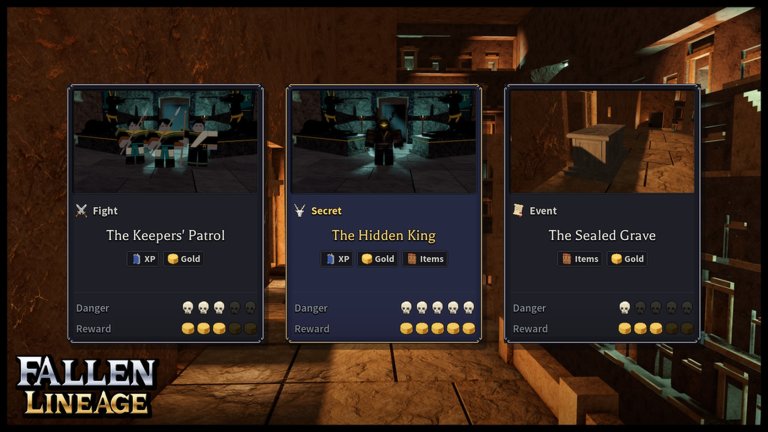
Fallen Lineage is a turn-based Roblox roguelite, but the UI still asks for precise inputs: menu order at character create, target previews before you commit, Space timing on Lunge, Confirm on stats, Apply on Passive Tree nodes, and Campfire choices that end or continue a run. This Controls Hub gathers those inputs in one place so you stop losing turns to misclicks.
Read it beside Getting Started, How to Play, and the Combat Guide. Systems depth lives on those pages; this page is the button-and-prompt map.
Account age gate
Your Roblox account must be at least seven days old. Younger accounts cannot join Fallen Lineage. If Play fails for a brand-new alt, wait out the age gate instead of hunting for a broken link.
Character creation order
- Press any key at the title screen, then select Play.
- In Characters, choose Create character in an available slot.
- Complete Background → Name → Appearance → Class, in that order.
- Select Create character to enter the opening The Road adventure.
Background is where Origins (Exile, Acolyte, Hunter, Scholar) and race panels sit—see Origins Hub and All Races after you understand the create flow. Use the mouse for menu buttons. Press Space when the UI shows Space Confirm, or to skip a cutscene when it shows Space Skip.
To continue an existing character, select its card in Characters to return to the castle. From the castle, Menu > Play returns to character selection.
Start Run: solo or party
After The Road drops you at the castle:
- Open Start Run.
- Choose Solo, then Play solo, or use Multiplayer > Find a party for a group of up to four players total including you.
- In Land, inspect enemy levels, item tier, and material icons. Select Choose under an available destination.
- In Difficulty, compare multipliers. Use Pick to change difficulty; the active option reads Selected.
- Select Set out.
Start with Forest on Normal. Forest lists enemy levels 1–5 and Tier 1 items. Destinations marked Locked cannot be chosen until unlocked—details on Lands & Progression.
Difficulty multipliers
| Difficulty | Enemy HP | Enemy damage | Rewards |
|---|---|---|---|
| Normal | ×1 | ×1 | ×1 |
| Hard | ×1.3 | ×1.2 | ×1.5 |
| Nightmare | ×1.6 | ×1.4 | ×2 |
Raise difficulty only after Inspect previews and timing checks feel automatic. Higher multipliers amplify mistakes as much as rewards.
Combat turn inputs
On your turn:
- Attack — basic attack that costs no Energy. Select Attack, then point at an enemy.
- Skills — open Skills, check Energy costs and availability, then select an available ability and target.
- Focus — restores 2 Energy but spends your action. Enemies stay alive to take their turns, so Focus when you can absorb the next round.
Inspect before you commit
After choosing Attack or a skill, point to an enemy and read the preview: Energy cost, damage, hit chance, critical and blocked outcomes, and projected remaining HP. Switch targets before deciding. A preview that says No dodge still needs its separate block chance checked. Finish a low-HP enemy with free Attack when the preview is enough, and save Energy for a healthier threat.
Lunge Space timing
For Lunge’s ring check, press Space as the moving ring meets the target ring. Timing results are Miss, Good, and Perfect. A timing Miss does not mean zero damage—dodge and block are separate outcomes. Practice the rhythm; Perfect improves payoff, but Miss still resolves an attack.
Read the Log after each action for actual damage and status results.
Confirm stats and Apply tree nodes
Open Character for Inventory, Stats, and Skills. Tree opens the Passive Tree. These panels are also available during route selection and Campfire rests.
- Stats: spend available Points with the plus controls, review bonuses, then select Confirm to apply.
- Passive Tree: choose a Gate, select connected nodes (blue = pending), then press Apply to turn connections gold. Cancel discards pending changes. Full Keystone notes live on the Passive Tree Hub.
- Equipment: hover new gear, use Shift Compare, check level and class requirements, then Actions > Equip.
Forgetting Confirm or Apply is a common “I spent points but nothing changed” mistake.
Campfire: Continue, advance, or Go home
At a Campfire, read the recovery panel (including Healed +30% and Wounds Gone when wounds clear). Open Character or Tree during the rest if you need to equip or spend points.
- Continue — advance the current route.
- End-of-region options such as To the Crypt / To the Catacombs — unlock and enter the next land when available.
- Go home — end the trip, review the run summary, then Continue to return to the castle.
Choose Go home when remaining HP or gear makes another fight a bad bet. Lives and death context continue in Reroll Tokens, Reset Orbs & Lives and the combat pages.
Practice drill for inputs
- One fight — only practice reading every Inspect preview before clicking.
- One fight — only practice Lunge Space timing; note Miss versus Good versus Perfect in the Log.
- One hub visit — Confirm one Stats spend and Apply one Tree node on purpose so the habit sticks.
- One Campfire — decide Continue versus Go home with HP and next land in mind.
When inputs are clean but fights still collapse, move to threat priority on the Combat Guide. When the loop itself is confusing, return to Getting Started and How to Play. Controls do not win bosses alone—but bad controls lose them before the plan starts.
Frequently Asked Questions
Quick answers to the most common questions.
Why can’t my new Roblox account join Fallen Lineage?
The account must be at least seven days old. Younger accounts are blocked from joining.
Does Attack cost Energy?
No. Attack is free. Skills spend Energy. Focus restores 2 Energy but uses your action.
What happens if I Miss the Lunge timing?
Miss, Good, and Perfect are timing results. Miss is not zero damage; dodge and block are separate outcomes.
How do I leave a run from a Campfire?
Choose Go home, review the run summary, then Continue to return to the castle.
What are the Hard and Nightmare multipliers?
Hard is ×1.3 enemy HP, ×1.2 enemy damage, ×1.5 rewards. Nightmare is ×1.6 / ×1.4 / ×2. Normal is ×1 across the board.